PlatePause
In TestFlight
A fasting timer that speaks in clock time — “Ends 6:30 PM” beside the elapsed hours, nine rhythms from 16:8 to 48 hours, and a journal that keeps your notes in your own words.
Coming soon — in TestFlight now
Only from Dolga
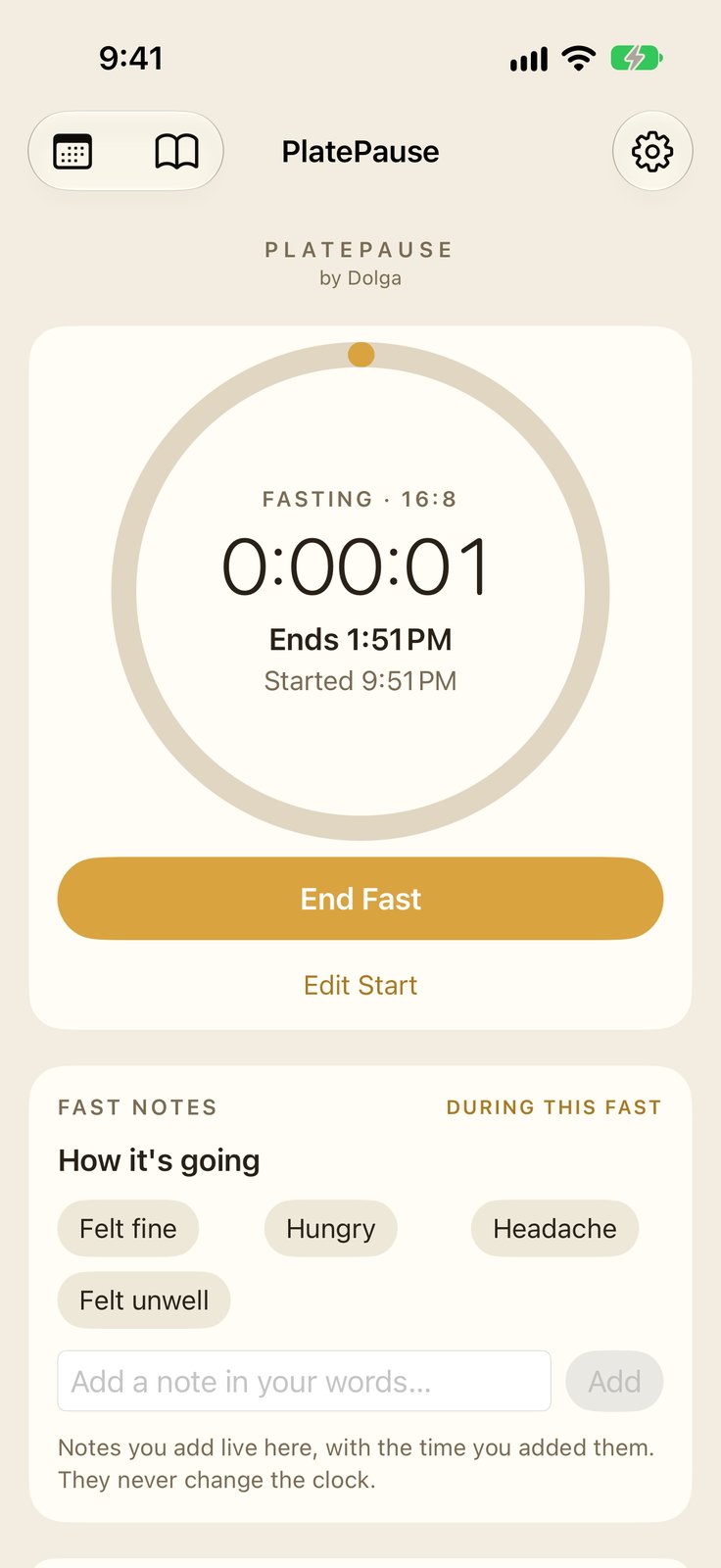
The end of your fast, in clock time — “Ends 6:30 PM,” not hours-remaining.
Every surface reads from the one stored start time — the ring, the widgets, the Live Activity — so the number you glance at is never stale. Start or end by voice, keep notes as you go, and take your whole record with you as CSV or PDF.
About
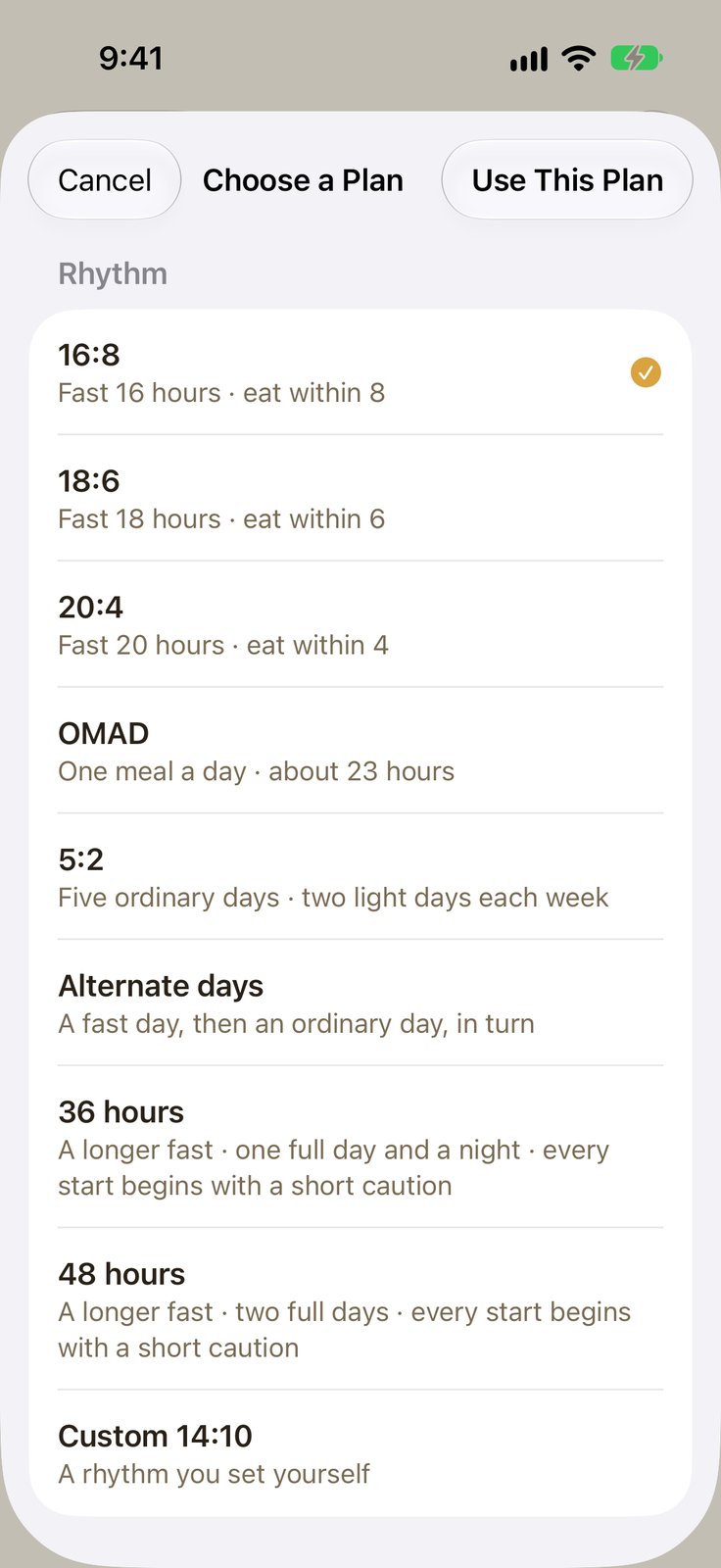
PlatePause keeps track of the hours in your fast. One tap starts the clock, one tap ends it — ending never asks you to confirm — and everything the app shows is worked out from the stored start moment, so the clock reads true even if the app stays closed for days. Nine rhythms are built in, and you can change plans mid-fast: the goal re-derives, the start time never moves.
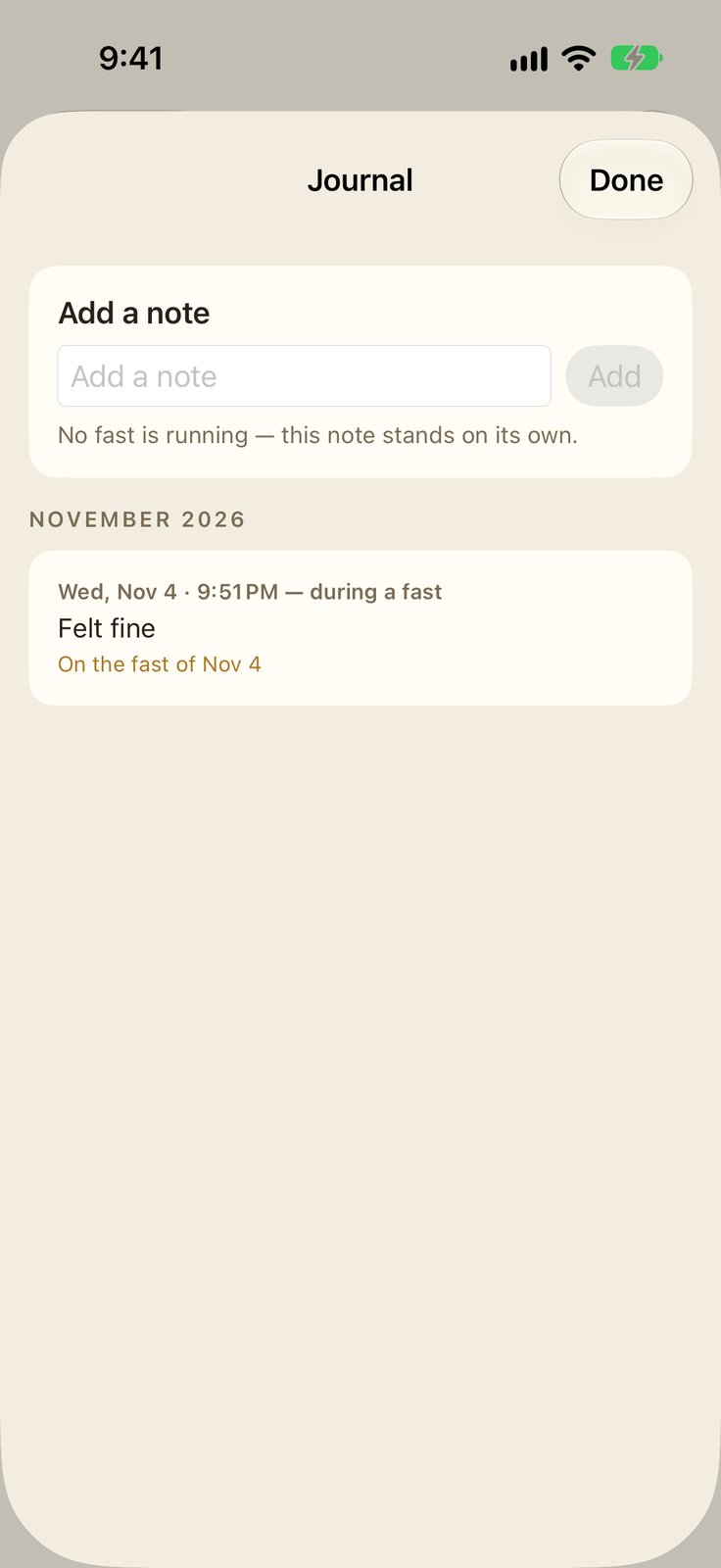
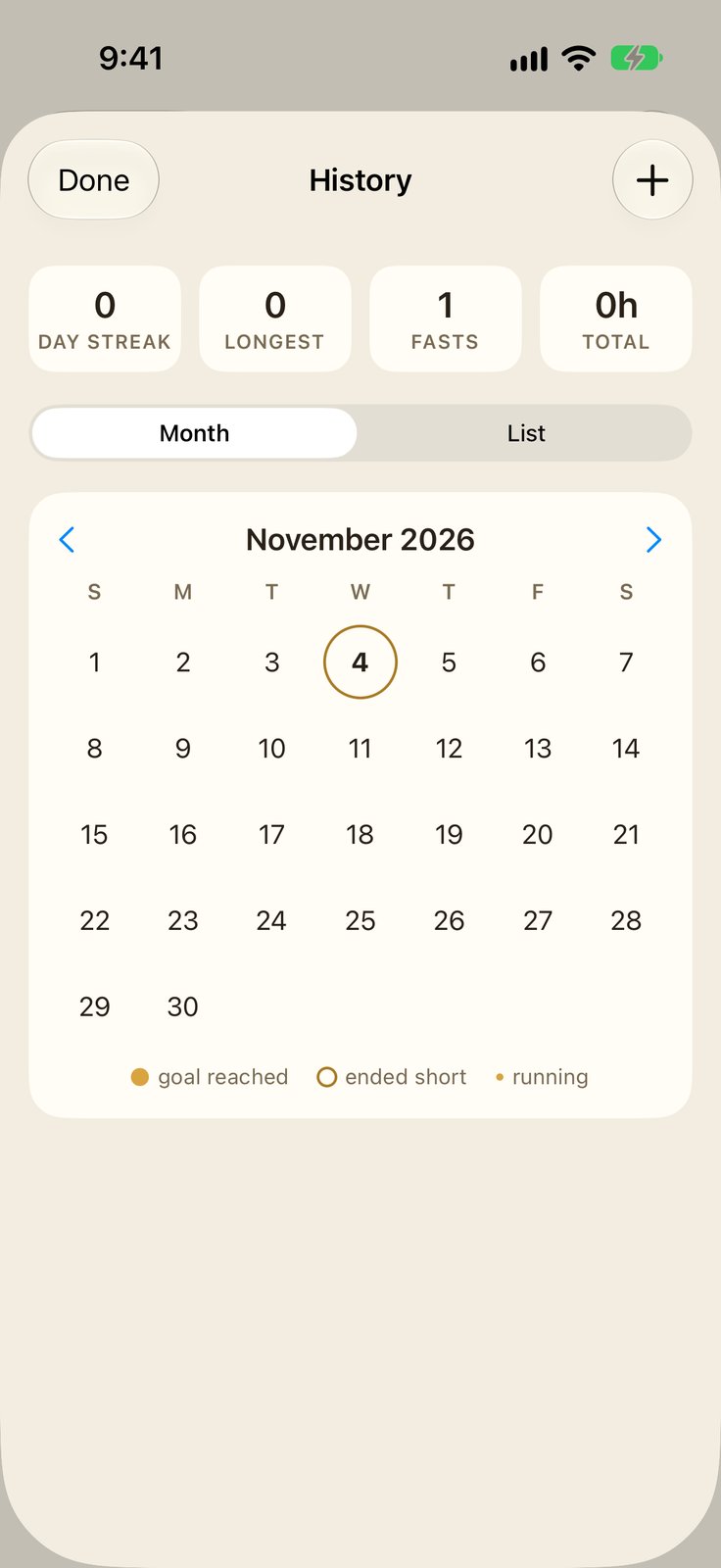
Fast Notes let you write how a fast is going, stamped with the time; the journal keeps every note in one store. Your record — calendar history and streaks — is recomputed from your recorded fasts every time, never kept as counters that could drift, and it exports as CSV or PDF whenever you want it. Widgets, a Live Activity and Siri all read from the same stored start time.
Paid once. No ads, no in-app purchases, no subscriptions. No account and no server — everything lives on your phone. And because it is a timer, not a coach: PlatePause gives no medical advice and recommends nothing — its cautions stand in full under How It Works below, exactly as they appear in the app.
Features
- A fasting timer that speaks in clock time — “Ends 6:30 PM” stands beside the elapsed hours, because nobody plans dinner in hours-remaining.
- Nine rhythms — 16:8, 18:6, 20:4, OMAD, 5:2, alternate days, 36 hours, 48 hours, and a custom rhythm you set yourself. Change plans any time, even mid-fast — the goal re-derives, the start time never moves.
- One tap to start, one tap to end — ending never asks you to confirm. Edit Start sits on the main screen for the fast you forgot to start on time.
- A record you can hold the app to — calendar history and streaks (current, longest, total fasts, total hours) worked out from your recorded fasts every time — never stored counters that could drift. The streak rule is printed in the app: a day counts when a fast reaches its goal.
- Fast Notes — note how a fast is going, in your own words, stamped with the time. The journal keeps every note in one store — on the fast, on the day, and between fasts.
- A gentle word for longer fasts — before any plan over 24 hours starts, the app shows its caution in full — every time, not just the first.
- Your record, to take with you — export your history as CSV or PDF from Settings. The file is made on your phone and leaves only through the share sheet, where you choose.
- Widgets for Home Screen and Lock Screen, and a Live Activity — that reads from the same stored start time — and ends when your fast ends. Prefer it off? There is a switch in Settings.
- Start or end a fast by voice — “Start my fast” / “End my fast” with Siri.
- Notifications are off unless you turn them on — in Settings — never a permission ask on launch or at a first fast.
- No account, no server, no ads — everything lives on the phone.
How It Works
The clock is the app
PlatePause keeps track of the hours in your fast. One tap starts the clock; one tap ends it. The app stores the moment you started, and everything it shows — elapsed time, the end time, your streaks — is worked out from that stored moment, so the clock reads true even if the app is closed for days.
Your plan
Nine rhythms: 16:8 (fast 16 hours, eat within 8), 18:6, 20:4, OMAD (one meal a day, about 23 hours), 5:2 (five ordinary days and two light days each week), alternate days (a fast day, then an ordinary day, in turn), 36 hours, 48 hours, and a rhythm you set yourself. Change plans any time — even mid-fast, and the goal simply re-derives; your start time never moves.
Starting, ending, fixing
Start and end with one tap — ending never asks you to confirm. Started late or early? Edit Start, right on the main screen, and the elapsed time re-derives. You can also record a fast you already finished, from History.
Streaks
A day counts when a fast reaches its goal. The counted day is the day the goal was reached. On 5:2, the plan’s rest days do not break a streak. Nothing else is counted, and the numbers are always worked out from your recorded fasts — never stored as counters that could drift.
Fast Notes
During a fast you can note how it’s going, in your own words — a few ready-made words about how you feel, plus anything you type. Notes are yours: they are never judged, sorted or summarised, and they never change the clock, a duration or a streak.
The journal
Every note stands in one store, with three doors onto it: on the fast while it runs, on the day in History, and in the Journal, where you can also write between fasts. A note written between fasts belongs to no fast. When a fast ends, you can add a few words for how it felt — or skip, and leave no mark. Those words join that fast’s record exactly as written; they are never counted, charted or compared, anywhere.
Your record, to take with you
In Settings, under Your record, you can export your history as a spreadsheet (CSV) or a document to read and print (PDF). The file is made on this phone, from your recorded fasts and your notes, and leaves only through the share sheet, where you choose where it goes.
Notifications
Off, unless you turn them on. The switches live in Settings — halfway, one hour left, fast complete, eating window closing. PlatePause never asks about notifications on launch or when you start a fast.
Widgets and Siri
The Home Screen and Lock Screen widgets and the Live Activity read from the same stored start time and speak in clock time — “Ends 6:30 PM” — so a glance surface never shows a stale number as if it were live. You can also say “Start my fast” or “End my fast” to Siri.
Before you fast
PlatePause is a timer. It keeps track of the hours in your fast; it does not give medical advice, and nothing in this app is a recommendation to fast.
Fasting is not for everyone. Do not fast if you are pregnant or breastfeeding, if you are under 18, or if you are underweight. If you take medication for diabetes or blood pressure, if you have a history of an eating disorder, or if you have any condition that food — or the timing of food — can affect, talk to your doctor before you fast, and follow their advice over this app’s clock, always.
If you feel unwell during a fast, end the fast and eat. If the feeling does not pass, seek medical care.
Before a longer fast
Plans over 24 hours — alternate-day, 36-hour and 48-hour fasts — are a bigger step than an overnight fast, and the cautions in “Before you fast” apply with more force here.
Do not start a longer fast if you are pregnant or breastfeeding, if you are under 18, or if you are underweight. If you take medication for diabetes or blood pressure, if you have a history of an eating disorder, or if you have any condition that food — or the timing of food — can affect, talk to your doctor before you begin, and follow their advice over this app’s clock, always.
PlatePause is a timer. It keeps track of the hours; it does not watch over you, and nothing in this app is a recommendation to fast for this long.
If you feel unwell at any point — faint, dizzy, sick, or simply wrong — end the fast and eat. If the feeling does not pass, seek medical care.
What PlatePause by Dolga uses
- Notifications — off unless you switch them on in Settings; never a permission ask on launch
- Siri — start or end a fast by voice, if you use it
- Nothing else — no account, no server, no location, no analytics. Your fasts and notes live on your phone, and leave only in an export you make yourself
Full details in our privacy policy.